

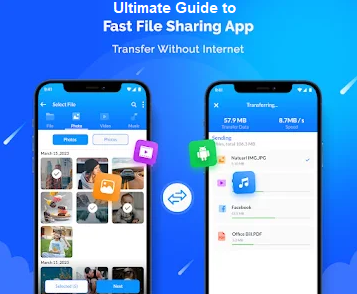
Moving heavy files between smartphones has long been a headache for users. While Bluetooth is notoriously slow, cloud-based options drain mobile data and raise privacy concerns. Enter the iShare app, a game-changing file-sharing utility designed to transfer photos, large videos, documents, and ZIP archives at incredible Wi-Fi speeds.
If you are looking for a reliable, offline way to share content, here is everything you need to know about the iShare app.
What is the iShare App?
The iShare app is a high-speed file-sharing application available for mobile devices. Unlike traditional sharing methods, it uses WebRTC peer-to-peer technology to establish a direct local connection between devices. This means your files travel across your local Wi-Fi network rather than external servers, ensuring maximum security and zero data costs.
Key Features of iShare
-
- Blazing Fast Speeds: Utilizing local Wi-Fi technology, it leaves Bluetooth speeds far behind, making it easy to send full photo albums or 4K videos in seconds.
- True Cross-Platform Sharing: It bridges the gap between different ecosystems, allowing seamless file transfers between Android and iOS devices.
- Absolute Privacy: Since files move directly from device to device without passing through cloud storage, your personal data remains completely safe from online leaks.
- Built-in Storage Tools: Beyond data transfer, newer versions include smart utilities like a duplicate file remover, cache cleaner, and an app-size fixer to help optimize phone storage.
- No Account Required: Users can skip tedious registration or sign-up forms. You simply open the app, scan a QR code, and start transferring instantly.
How to Use the iShare App for Quick Transfers
Getting started with the app requires just three easy steps:
-
- Open and Pair: Launch the iShare app on both devices and ensure they are connected to the same local Wi-Fi network.
- Scan the QR Code: Generate a transfer link or scan the on-screen QR code using the receiving phone to securely pair the devices.
- Select and Send: Choose the videos, photos, apps, or folders you want to move and hit send. A stable background service handles the rest, even if you switch apps.
Final Verdict: Is iShare Worth It?
For anyone tired of slow transfers or expensive cloud subscriptions, the iShare app is a must-have utility. It successfully combines speed, privacy, and simplicity into a single lightweight package, making it one of the most efficient local sharing tools on the market today.










Leave a Reply